Uncategorized - CNET

The Absolute Best Horror Movies on Hulu

Hulu is packed with great horror films. Before we list the streaming service’s absolute best options, let’s cover some worthy alternatives. 

Hulu is home to all the films in the Alien franchise (plus the new TV series Alien: Earth). There’s also the post-apocalyptic horror flick 28 Weeks Later (2007), body horror film Crimes of the Future (2022) and romance-gone-wrong Fresh (2022). Finally, you should check out Cuckoo (2024), A Quiet Place Part II (2021) and Immaculate (2024), starring Sydney Sweeney.

Now, on to a roundup of the best horror movies on Hulu.

Best CD Rates for July 2025: APYs as High as 4.50% Won’t Stick Around Forever

Certificate of deposit rates have largely held steady lately, but that doesn’t mean you should wait too long to open an account. Although the Federal Reserve paused interest rates for the fourth time in a row this month, some experts believe it could begin cutting rates as soon as this month. That means now’s the time to lock in your annual percentage yield while APYs remain high.

To help you narrow down your options, we’ve rounded up our top choices.

Best CD rates for July 2025

Bank 6-month APY 1-year APY 3-year APY 5-year APY
BMO Alto 3.00% 3.00% 2.75% 2.85%
CommunityWide Federal Credit Union 4.50% 4.40% 3.80% 3.40%
First Internet Bank of Indiana 4.49% 4.40% 3.97% 3.97%
Bread Savings 4.45% 4.00% 4.00% 4.00%
CFG Bank N/A 4.15% 3.75% 3.65%
LendingClub 4.00% 3.75% N/A 3.40%
MYSB Direct 4.15% 4.00% 3.91% 3.91%
NexBank 4.14% 4.35% 3.44% 3.29%

Average CD rates

Because APYs represent the yield you’ll earn for a year, CD terms shorter than 12 months typically have lower returns. Right now, short-term CDs have higher APYs than most long-term CDs. That means you can earn a decent return for locking up your money for a short time and you’ll have access to your funds sooner. It’s always a good idea to compare rates at different banks and credit unions before opening a CD, to get the best offer to fit your financial goals.

Below is a look at the average CD rates by term based on those tracked by the Federal Deposit Insurance Corporation and those we tracked at CNET. The FDIC includes rates from major national banks, which are historically lower than online-only banks.

Type

6-month

1-year

3-year

5-year

FDIC-tracked

1.57%

1.62%

1.34%

1.33%

CNET-tracked

4.00%

3.98%

3.59%

3.59%

Note: APYs shown are as of June 26, 2025. CNET’s editorial team updates this information regularly. Source: FDIC.

Best CD rates by bank

Is now a good time to open a CD?

I have zero regrets on not waiting — that money in the CD was not money I was planning to spend any time soon, and it actually helped me take the mental gymnastics out of thinking of what to do with the money.

Whether now is a good time to lock in a CD depends on your financial goals.

Bernadette Joy, founder of Crush Your Money Goals, notes that the real benefit of a CD is locking in a fixed return. Joy put her money into two one-year CDs that offered a bit over 4% in February 2023, then witnessed rates go even higher.

“I have zero regrets on not waiting — that money in the CD was not money I was planning to spend any time soon and it actually helped me take the mental gymnastics out of thinking of what to do with the money,” Joy said. She also opened an 11-month CD with a 6.15% APY.

CD rates have been falling for months and the possibility of rate cuts in 2025 means they could fall even further. There’s a decent chance that the longer you wait to open a CD, the lower the APY you might be able to get.

What to know before opening a CD

When you’re ready to open a CD, consider these factors to choose the best one for you:

  • Term: Think about how long you can leave the money deposited in a CD account. If you’ll need access to your funds before a CD term ends, consider a high-yield savings account with more liquidity, a shorter CD term or a no-penalty CD to avoid paying an early withdrawal penalty. 
  • APY: Look for the highest yield available for the CD term you’ve selected. Online-only banks and credit unions usually offer the best rates but if a minimum deposit is required, make sure you’re comfortable with the amount or choose another bank that doesn’t have that requirement. 
  • Type: There are many types of CDs that still give you a guaranteed rate of return while offering more flexibility than a standard CD. Some CD types have lower APYs and limited CD terms to choose from. Consider your financial goals and various CD options to determine what’s best for your money.
  • Early withdrawal penalty: Unless you choose a no-penalty CD, most banks charge an early withdrawal penalty if you need to pull money from your CD before the term ends. This is usually a period’s worth of interest, depending on the term and the bank. If you’re worried about not having access to your funds, consider another savings option or a bank with a lower early withdrawal penalty. 
  • Minimum deposit: CDs allow only a one-time initial deposit and some banks require a minimum amount to open an account. If this is a problem, consider an account with a lower (or no) deposit requirement.

Alternatives to CDs 

If you want to make regular contributions to your savings, or you’re looking for a higher rate, there are other savings options worth exploring.

If you need the flexibility to deposit and withdraw money regularly while still earning a high yield, consider a high-yield savings account . Although high-yield savings accounts have variable interest rates — meaning they rise and fall based on the economy and the bank’s preferences — top rates are currently as high as 5% APY.

The main appeal of a high-yield savings account over a CD is flexibility. You may be charged an early withdrawal penalty if you take money out of a CD before the term ends but you can access funds in a savings account whenever you need them. This makes it a good spot to stash your emergency fund or money for short-term goals like a holiday fund or concert tickets

A money market account functions like a savings account but often has checking account privileges like the ability to write checks or make transactions with a debit card. Money market accounts also have competitive APYs, although most are lower than the best CD rates.

Most money market accounts require a high minimum balance to earn interest. Although these accounts usually come with a debit card and check writing, you’ll be limited to a certain number of transactions per month.

CDs and treasury bonds are low-risk savings options with a fixed rate. Most CDs are insured by the National Credit Union Association or the Federal Deposit Insurance Corporation; bonds are backed by the government or company that sells them. 

You’ll have a guaranteed return as long as you don’t withdraw money before the bond or CD matures. If you do, you could miss out on future interest and pay a penalty that lowers the value. 

Other types of CDs to consider 

Several types of CDs offer more flexibility than a standard CD. For example, an add-on CD lets you add funds after your initial deposit, while a bump-up or step-up CD increases your yield if rates go up. A no-penalty CD allows you to withdraw your money without incurring an early withdrawal penalty.

If there’s a chance you’ll need access to the money in your CD before the term ends, a no-penalty CD is a good option. No-penalty CDs typically offer lower yields than traditional CDs because you can take your funds out before maturity, said Chelsea Ransom-Cooper, managing partner and financial planning director at Zenith Wealth Partners .

If you’re looking for flexibility and a better return, another option would be a money market account, Ransom-Cooper added. Here’s a look at rates for no-penalty CDs .

A bump-up CD allows you to take advantage of a higher rate for your CD term if one becomes available after you open your account. The APY may still be lower than a standard CD.

The advantages of a bump-up CD are determined by the rate environment. If you think rates might go up and don’t want to be stuck with a low APY, this could be a fail-safe technique.

Because the Federal Reserve has paused rates at its last three meetings, and is expected to cut them later this year, you should evaluate if this kind of account makes sense for you.

How to open a CD

Here’s a step-by-step guide to help you open a CD.

  • Compare banks and rates. You can open a CD at your local physical branch or online. Most retail banks and credit unions also offer CDs or share certificates, as do online-only banks. Make sure the bank or credit union you choose is FDIC- or NCUA-insured to protect your funds. All the banks we track above are FDIC- or NCUA-insured.
  • Choose the CD type and term. When you’re ready to open an account, you’ll choose the CD type and term you want. Be sure to compare rates and weigh all options based on your savings goals. 
  • Complete an application. Just like with a checking or savings account, you’ll fill out an application with your personal information, including your name, birth date, Social Security number (or Individual Taxpayer Identification Number) and address. 
  • Fund your account. When opening a CD, you’ll need to make a one-time deposit. You won’t be able to make any additional contributions so you should open the CD only when you have the funds available.

After you’ve set up your account, you’ll begin earning interest. When your CD matures at the end of the term, you can withdraw your funds or reinvest them into another CD at the then-current rate.

FAQs

Choosing between a CD, money market or high-yield savings account depends on your financial goals, timeframe and liquidity needs.

For instance, if you’re starting from scratch, you may choose a high-yield savings account to build up your savings. If you plan to have a high balance but need debit card access, you might go with a money market account. If you already have the funds and won’t need them for a while, a CD is a good option.

Because early withdrawal penalties vary depending on the bank and CD term, there isn’t a standard way to calculate them. Most early withdrawal penalties equal a loss of interest or dividends for a certain period. A longer CD term generally has a greater penalty for early withdrawal.

If you need access to your funds before the CD matures, some banks require you to withdraw the entire amount of the account, while others charge a penalty only on the amount of a partial withdrawal. If the early withdrawal penalty exceeds the interest you’ve earned, you’ll lose money on your principal investment.

Many banks tie the APY that CDs earn to the federal funds rate established by the Federal Reserve. The federal funds rate is the rate banks use to lend and borrow money. The rates on CDs can rise and fall based on actions taken by the Fed to regulate the health of the economy.

For instance, the sequence of Fed rate hikes from 2022 to 2023 caused APYs to increase. A series of rate pauses after that caused APYs to largely hold steady. Since the Fed’s September rate cut — its first in years — we’ve seen CD rates fall, and they’ve continued falling since the Fed cut rates again in November and December. Although the Fed chose to hold rates steady in January, March, May and June, experts expect rate cuts to resume later this year.

You typically won’t lose money with a CD, as long as you keep your funds invested until the term ends. If you withdraw money from your CD early, you’ll often pay an early withdrawal fee that’s equal to a certain amount of interest. This fee could cut into your principal — the amount you initially deposited — if the fee is greater than the interest you accrued.

In addition, a CD at an FDIC- or NCUA-insured bank or credit union protects your deposit for up to $250,000 per person, per account category in case of a bank failure or loss. The value of a brokered CD purchased through an investment firm or brokerage can fluctuate and isn’t always protected by federal insurance.

You should leave your money untouched in a CD until the term you’ve chosen ends. Then you can renew it for the same period, choose another CD term or bank altogether or withdraw your funds for something else.

If you don’t withdraw your money when the term ends, some CDs are set up to automatically renew, and you might get locked into a lower interest rate. CDs generally offer a grace period of a few days so you can decide whether to withdraw the money or renew the CD. It’s a good idea to have a plan for your funds once the CD term ends.

Our CD methodology

CNET reviews CD rates based on the latest APY information from issuer websites. We evaluated CD rates from more than 50 banks, credit unions and financial companies. We selected the CDs with the highest APY for five-year terms from among the organizations we surveyed and considered rates for shorter terms if five-year terms were identical or unavailable. All information is reviewed by experts for accuracy.

Banks we reviewed 

Alliant Credit Union, Ally Bank, America First FCU, American Express National Bank, Barclays, Bask Bank, Bethpage, BMO Alto, Bread Savings, Capital One, CFG Bank, CIT, CommunityWide Federal Credit Union, Connexus Credit Union, Discover, EverBank, First Internet Bank of Indiana, First National Bank of America, Forbright, Lending Club, Limelight Bank, Marcus by Goldman Sachs, MYSB Direct, NexBank, Popular Bank, Quontic, Rising Bank and Synchrony.

The editorial content on this page is based solely on objective, independent assessments by our writers and is not influenced by advertising or partnerships. It has not been provided or commissioned by any third party. We may receive compensation when you click on links to products or services offered by our partners.

11 Excellent Horror Movies to Stream on HBO Max

You have a plethora of streaming platforms to choose from when you want to watch a horror movie. So why should you spend time sifting through HBO Max?

With new movies like Sinners and classics like The Silence of the Lambs in its catalog, HBO Max’s library is up there with the best of them. The streamer recently reinstalled the HBO portion of its name and starts at $10 per month or $100 per year. You can also get the streaming service free with a Doordash DashPass annual plan. If you’re in the mood for a horror movie, here are 11 excellent options.

Best VPN for Amazon Fire TV Stick in 2025: Unblock Region-Restricted Content on Your TV

What is the best VPN for Amazon Fire TV Stick in 2025?

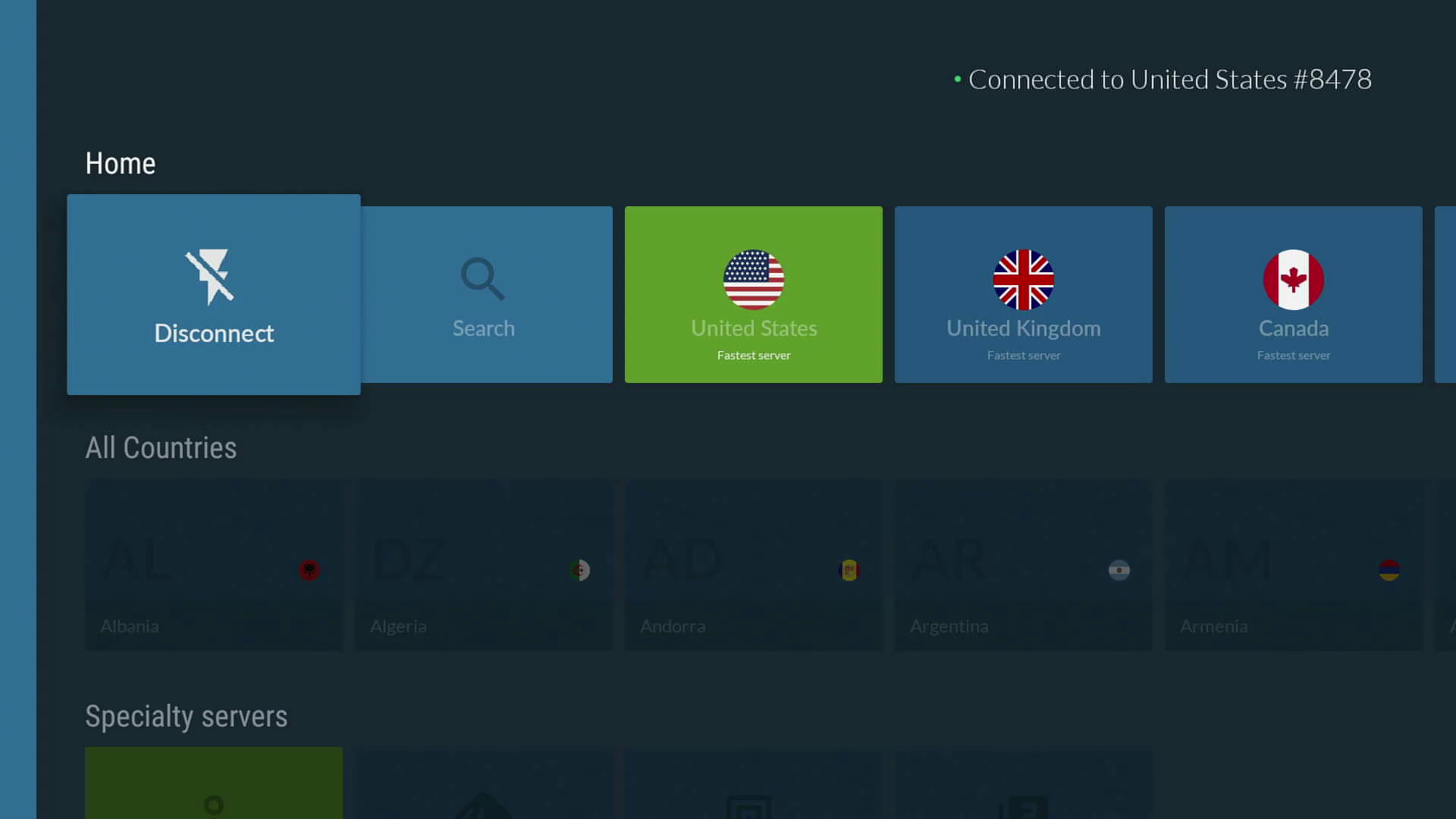
ExpressVPN is the best VPN for Fire TV Sticks overall, thanks to its extremely user-friendly app, quick connectivity and excellent streaming content unblocking. With servers in all 50 US states, ExpressVPN is a great VPN for streaming regional sports content, like NFL or WNBA games.

ExpressVPN Amazon Fire TV app dashboardScreenshot/CNET

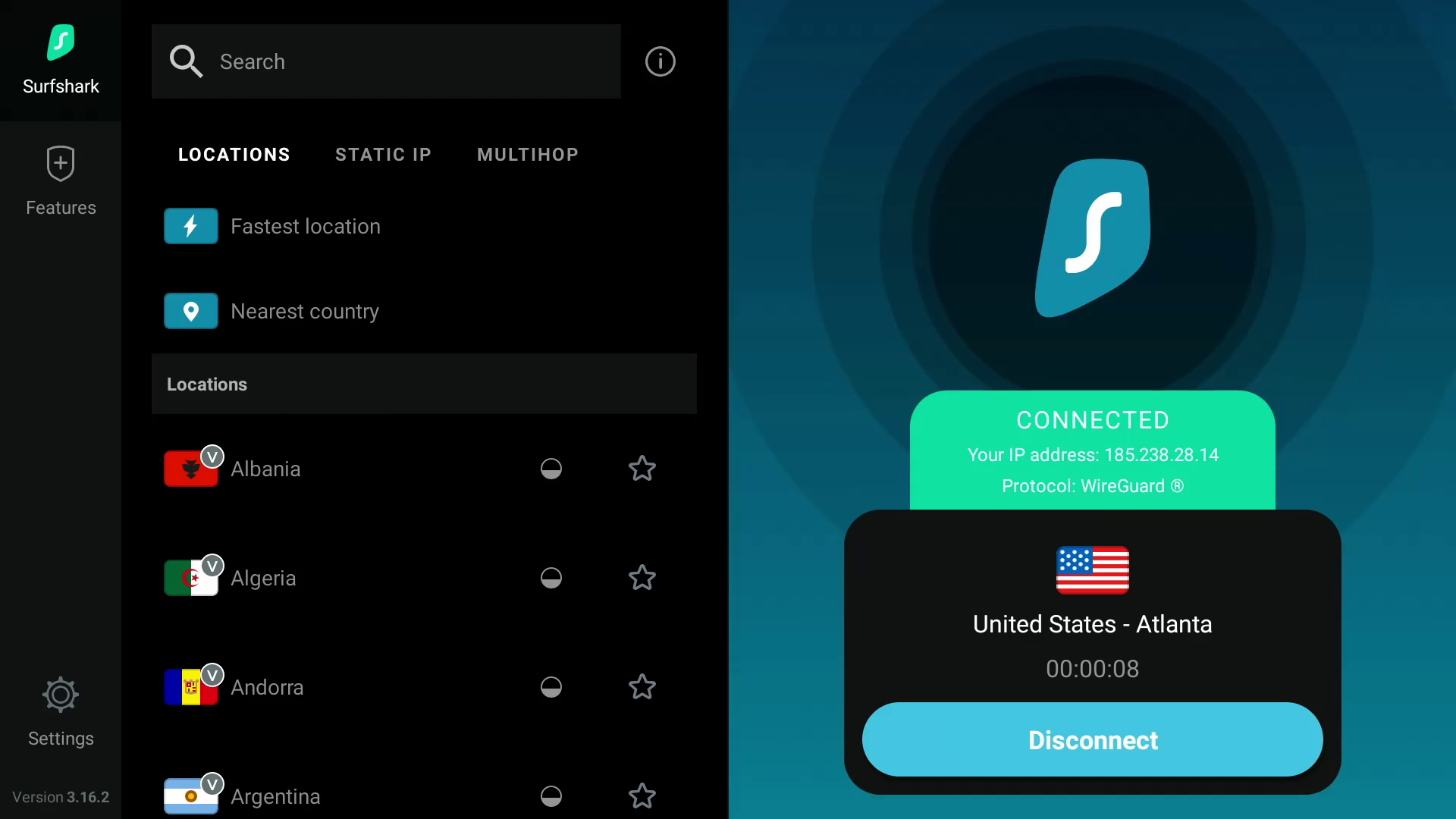
Surfshark is the best value VPN for Amazon Fire TV devices because of its fast speeds and ability to access multiple Netflix regional libraries.

Surfshark VPN dashboard on Amazon Fire TVScreenshot by CNET

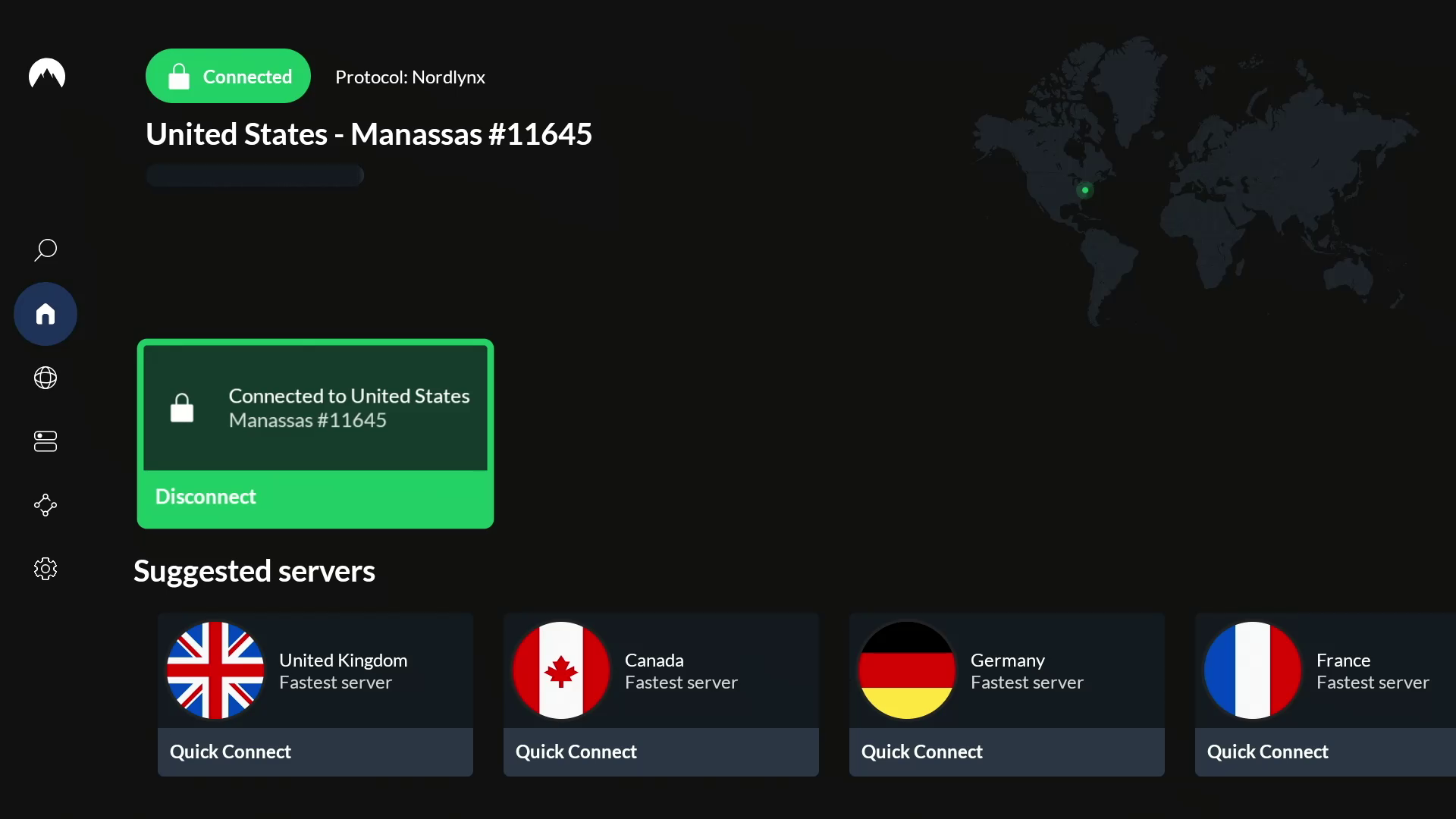
NordVPN is the fastest VPN for Fire TV Stick users based on CNET’s hands-on testing, delivering an exceptionally smooth 4K streaming experience.

NordVPN dashboard on Amazon Fire TVScreenshot by CNET

Why use a VPN for Fire TV Stick?

Amazon’s Fire TV Stick is an affordable streaming device that offers access to a world of apps like Netflix, HBO Max, Disney Plus and Amazon Prime Video. However, geographical restrictions can limit the content available to watch in your region. Due to regional licensing agreements, streaming services can only offer a certain selection of titles in a specific country. For instance, if you’re traveling to another country, your favorite TV shows and movies that you stream at home may not be available to watch in the country you’re visiting.

However, with a VPN, you can route your internet traffic through an encrypted server to hide your public IP address, which can make it look like you’re in another city, state or country. Because most streaming sites typically rely on your IP address to determine your location (and therefore what content library to show), changing your IP address to make it appear as though you’re in a different country using a VPN on your Fire TV Stick can help you unblock region-restricted content from all over the world that wouldn’t normally be available in your location. A VPN can help you unblock worldwide content from streaming services like Netflix, Disney Plus, HBO Max, Amazon Prime Video and BBC iPlayer, in addition to accessing your home streaming libraries while you’re out of the country. So you can enjoy The Waterfront on Netflix or The Accountant 2 on Amazon Prime Video from anywhere around the world. A VPN can even help you stream regional sports games, like NFL matches. Because the VPN encrypts your traffic, you can keep your Fire TV Stick streaming activity private from your ISP and potentially bypass bandwidth throttling, which might slow down your internet speeds.

The best VPNs for Fire TV Stick all have user-friendly apps that you can download directly to your streaming device. However, one may work better for you than another, depending on your budget and the specific streaming content you want to access. Based on my hours of testing several VPN services in my latest evaluations, ExpressVPN retains its standing as the best Fire TV Stick VPN available in 2025, thanks in large part to its incredible ease of use and impressive unblocking capabilities across regions and streaming services. Read on to learn more about what to look for in the best VPNs for Fire TV Stick.

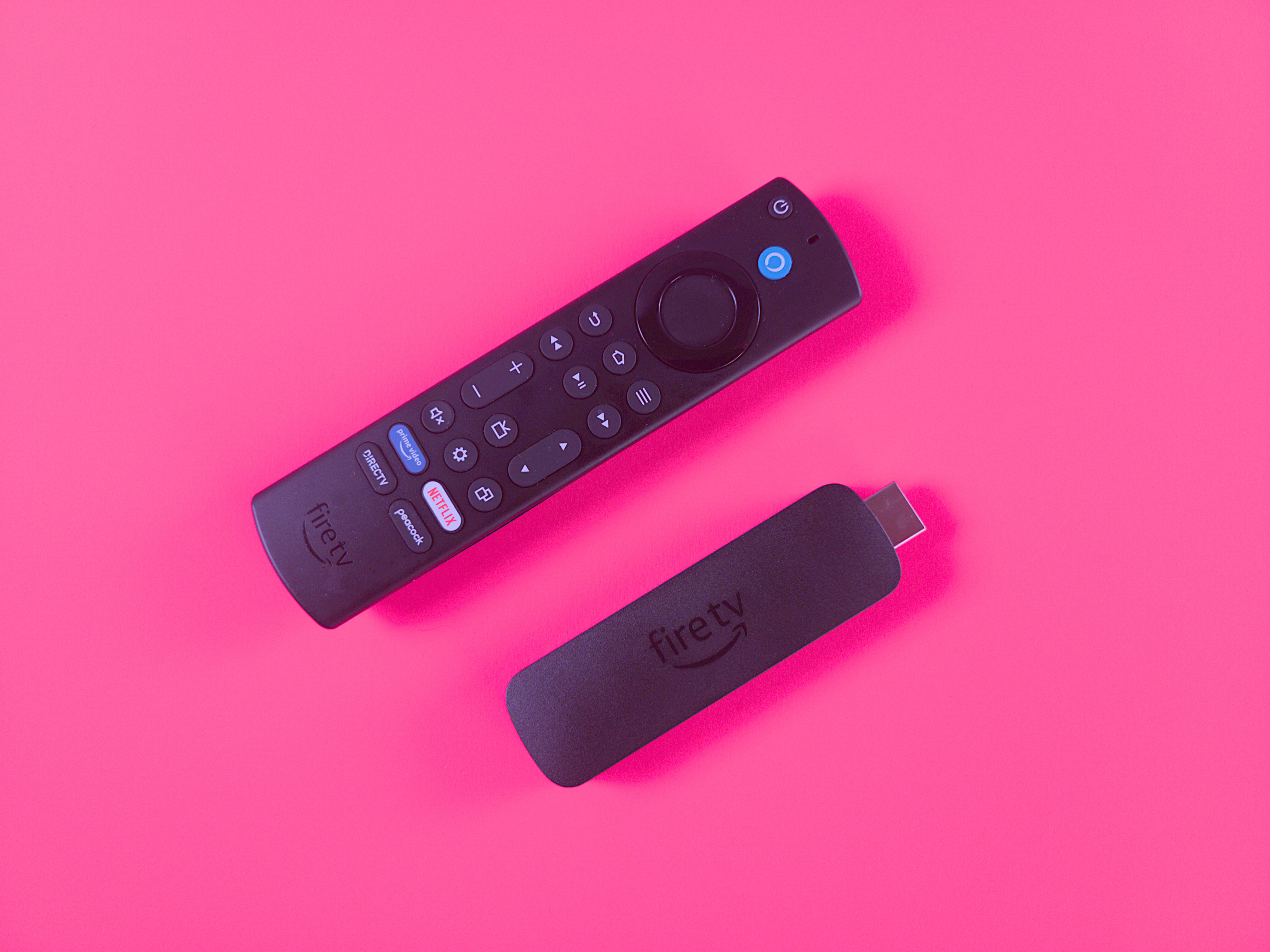
Amazon Fire TV Stick and remote

You can use a VPN with your Amazon Fire TV Stick to protect your privacy and get past streaming geoblocking.

Getty Images/Amazon/CNET

How to choose the right VPN: Factors to consider in a Fire TV Stick VPN

Privacy

If you want to keep your viewing activities on your Fire TV Stick hidden from your ISP, then you’ll want a VPN that delivers on privacy. Generally, you want to use a provider that offers AES-256 over OpenVPN, or ChaCha20 over Wireguard, to be sure that your internet traffic is being encrypted in a secure way. Be sure to check the VPN provider’s privacy policy to see what personal information may be collected, who it’s shared with and how it’s protected. Do some research into any privacy or security incidents that the VPN company may have dealt with in the past. Look into the provider’s no-logs policy and check for any third-party no-logs audits or real-life cases where the provider’s no-logs claims were put to the test. Also, you’ll want to make sure the VPN has a kill switch and DNS leak protection to ensure your traffic doesn’t leak unencrypted. 

Speed

Nothing’s worse than constant buffering when you’re trying to stream movies or shows with your Fire TV Stick. You’ll need a fast VPN to ensure a smooth streaming experience, especially if you’re streaming in 4K. Keep in mind that a VPN will slow your internet speeds, sometimes by 50% or more — although, the fastest VPNs we tested slowed our base speeds by an average of only 20% or less. With a VPN that cuts your internet speeds by 20% or less, you’ll probably hardly notice the speed reduction, and your speeds should be sufficient for streaming on your Fire TV Stick (provided your base internet speeds are fast enough to begin with). Netflix recommends speeds of at least 5Mbps for high-definition streaming, whereas 4K content needs at least 15Mbps. But for a smooth and stable 4K streaming experience, your speeds should be closer to 50Mbps.

Streaming and unblocking capabilities

Most VPNs advertise that they’re great for streaming, but the reality is that there are only a few out there that are truly great streaming VPNs. It’s more than likely that you’ll be spending a lot of time streaming TV shows and movies using your Amazon Fire TV device, so you need a VPN that can keep up. This doesn’t just mean that it’s fast — you’re also looking for a VPN that has plenty of servers around the world to give you more choice when it comes to unblocking streaming services around the world. You’ll also want to make sure that a VPN has the ability to unblock content on streaming services like Netflix, Disney Plus, HBO Max, Hulu, BBC iPlayer and Amazon Prime Video. The best way to do this is to test it out by taking advantage of a money-back guarantee. If the VPN works and unblocks the stream you want, great. If not, you can ask for a refund and try a different VPN provider.

Usability

Just because a VPN has a dedicated app for Amazon’s Fire TV Stick, doesn’t necessarily mean that it’s a good VPN for the device. You’ll want your VPN to be easy to use on your Fire TV Stick. The app should be similar to its desktop and mobile counterparts and should be just as simple to navigate, apply settings and connect to a server. It should also connect quickly and remain connected throughout your streaming sessions. 

Cost

If you’re on a budget, cost will be an important consideration in choosing a VPN for your Fire TV Stick. VPN prices can vary from provider to provider, but you’ll typically save more money in the long run when you commit to a longer timeframe. You can expect to pay anywhere from $30 to $150 per year for an annual VPN subscription, and anywhere from $5 to $15 for a monthly VPN subscription, depending on which VPN you go with. 

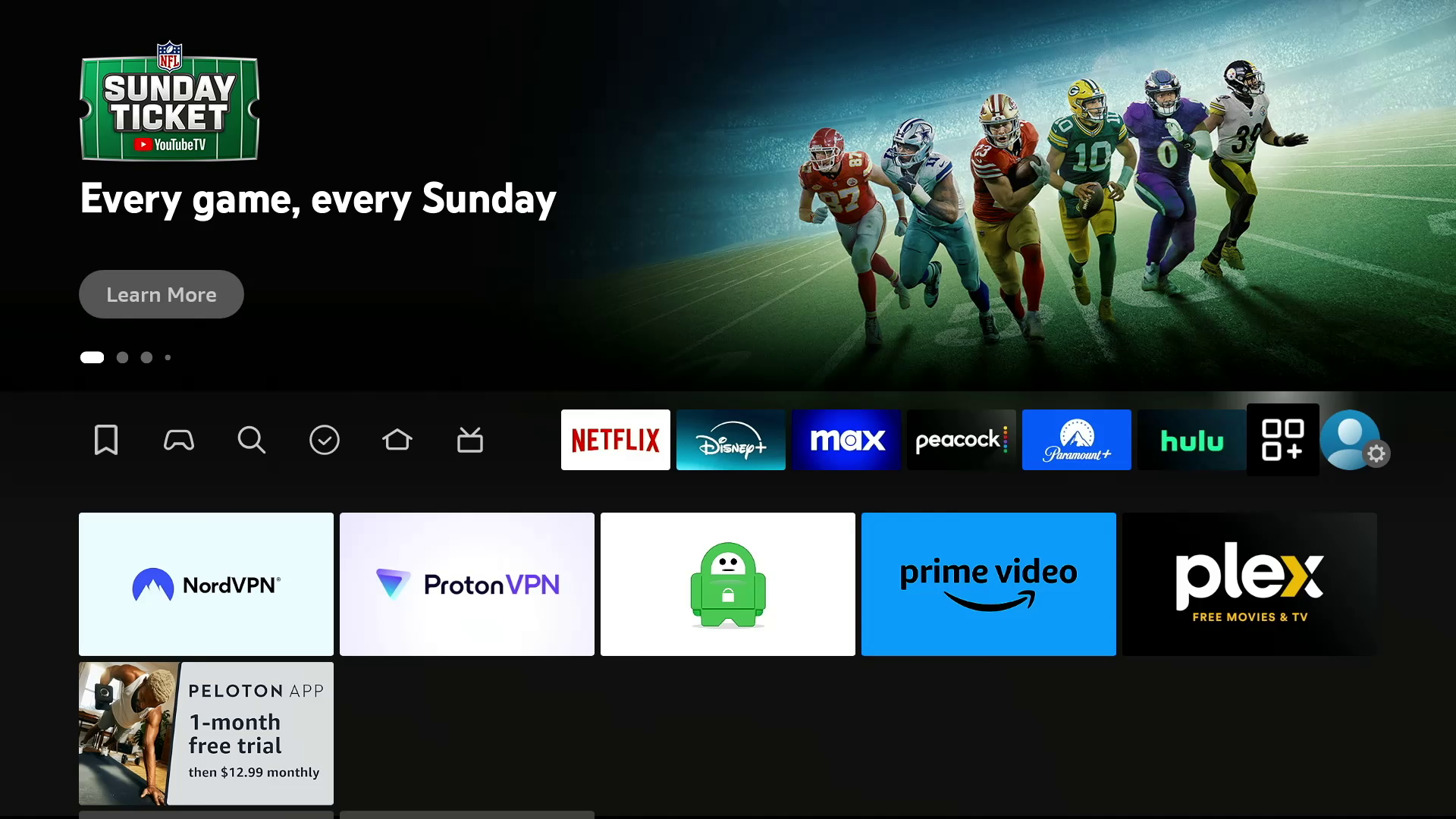
Amazon Fire TV apps screen with VPNs installedScreenshot by CNET

How I tested VPNs on Fire TV Stick

Each of CNET’s top VPNs offers a native VPN app for the Fire TV Stick, but a few of them stood out during my tests. In addition to evaluating the usability and features of the Fire TV Stick VPN apps, I prioritized other important factors like security, speed and unblocking capabilities of each VPN I tested.

For my evaluation, I tested each VPN on a Fire TV Stick 4K Max. I opened each app on the Fire TV Stick and first tried to get a sense of its usability and available features. Is the app easy to navigate, and are the servers organized in a way that makes them easily accessible? Are the features useful, organized and simple to access?

I then evaluated the overall performance of the app to see if the servers connected quickly, whether or not the connections were stable and how well the features performed. Finally, I tested how well each VPN performed in terms of unblocking geographically restricted content through various server locations and on various popular streaming services like Netflix, Disney Plus, HBO Max, Hulu and Amazon Prime Video. I tested to make sure the streaming services loaded up and started playing content quickly. I also noted whether the streaming experience was smooth and free of buffering, especially when streaming in 4K. The VPNs that consistently passed these tests earned a spot among my picks for the top Fire TV Stick VPNs.

NordVPN running on an Amazon Fire TV Stick Lite

NordVPN’s Fire TV Stick app is easy to navigate and full of useful features.

Screenshot by CNET

How do I install a VPN on Amazon’s Fire TV Stick?

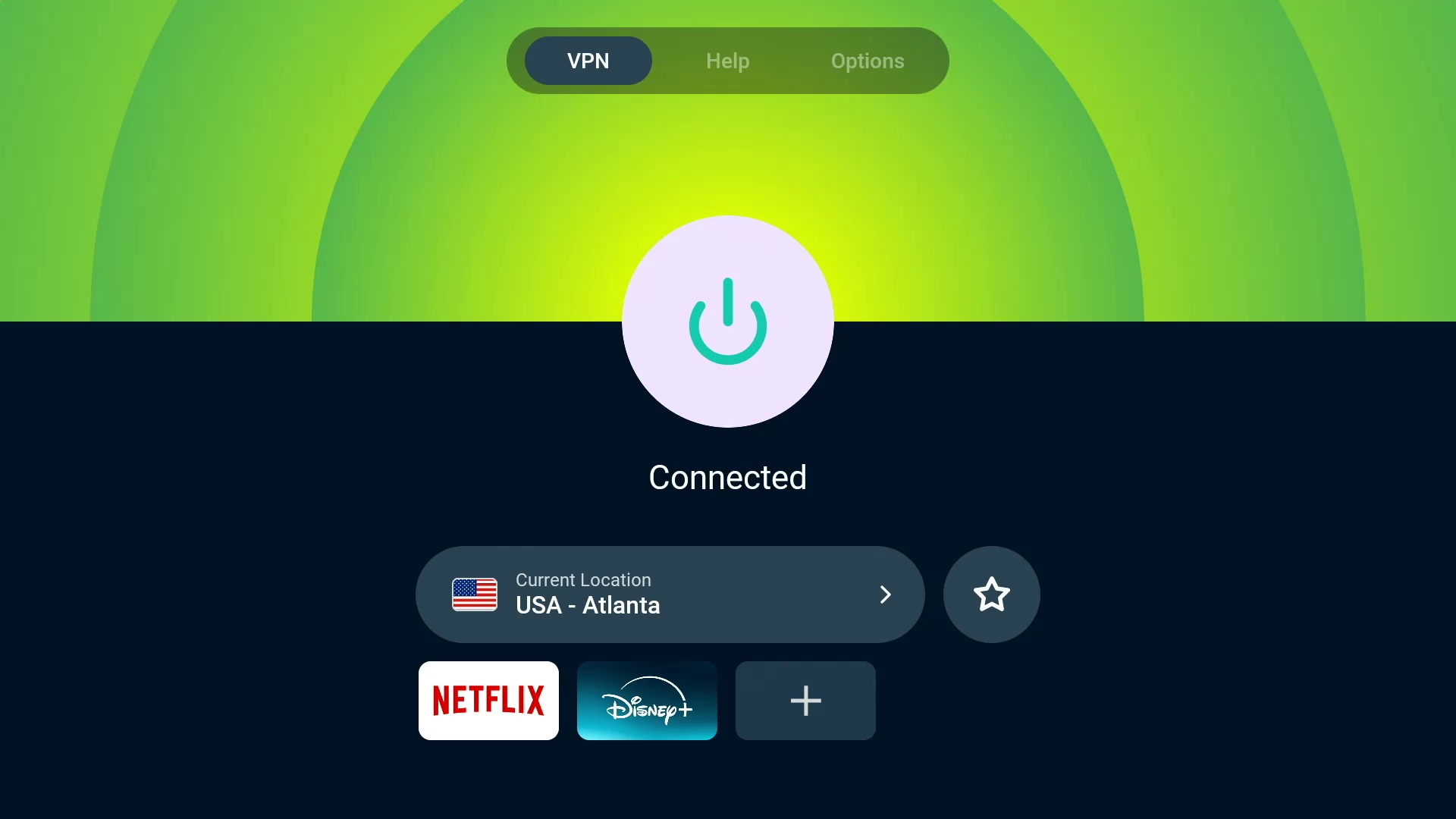
Installing a VPN on the Fire TV Stick is easy. You can either navigate to the magnifying glass search icon on your Fire TV home screen and use your remote or Fire TV app on your smartphone to type in the name of the VPN you want to download, or you can use the Alexa function on your Fire TV remote and say the name of the VPN. Then, click on the logo of your selected VPN and click on Get to initiate the download. Click on Open to launch the app and log into your account. Once you’ve logged in, your VPN will ask for your permission to set up a VPN connection. Click on OK to allow the VPN to create the connection. Once you’ve given your VPN permission to connect, you can start using the VPN on your Fire TV Stick. 

Which Amazon Fire TV device is best for streaming with a VPN?

amazon-fire-tv-4k-max

The $55 Amazon Fire TV Stick 4K Max (2023) features a new Ambience mode.

Ty Pendlebury/CNET

You’ve got multiple Amazon Fire TV devices to pick from, and the Amazon Fire TV Stick 4K Max is our choice as the best overall. In our testing, we liked its Wi-Fi 6 support, which helps when streaming high-bandwidth 4K video content on your favorite apps, like Amazon Prime Video, Netflix or Disney Plus. We also appreciated the Fire TV Stick 4K Max’s capability to stream in the latest video standards, like Dolby Vision HDR.

The Amazon Fire TV Cube is great for home theater or smart home enthusiasts. We appreciate that it doubles as a smart speaker with Alexa onboard, so you can use voice search to look up movies and shows, adjust the volume, change TV inputs, stream music and more. There’s even an HDMI input, so you can connect cable boxes, game consoles and other devices to your Fire TV Cube, which can be great if you’re a home cinema buff with too many devices and not enough HDMI inputs on your TV.

You can install a VPN directly on your smart TV if you’re using a television that runs Amazon Fire TV OS, like the Amazon Fire TV Omni or Panasonic Z95A OLED.

CNET speed test data

Any VPN will slow down your internet speeds (sometimes by as much as 50%), but a fast VPN should only drop your download speeds by an average of about 25% or less. We run over 250 individual speed tests per provider when we test VPNs. NordVPN was the fastest VPN we assessed in our latest round of testing, with a 3% average download speed loss. Surfshark, Proton VPN, Mullvad and ExpressVPN all registered speed loss of less than 25%. Because streaming video on an Amazon Fire TV stick requires fast internet speeds — especially for 4K or 1080p content — you’ll want a reliable VPN that minimally cuts your download speed. Here’s how our top VPN recommendations stacked up:

Other VPNs we tested on the Fire TV Stick


ipvanish-400x225-usjc.jpg

IPVanish

  • Servers: 2,400-plus
  • Number of countries: 108
  • Country/jurisdiction: US
  • Platforms: Windows, MacOS, Linux (CLI), Chrome OS, Android, Android TV, iOS, iPadOS, Fire TV, Apple TV
  • Price: $13 per month, $40 for the first year (then $156 annually) or $52 for the first two years combined (then $312 every two years)

I also tested IPVanish on the Fire TV Stick. Its app includes various settings and features to tool around with, but its high 44% average speed loss makes it unreliable for streaming video. The automatic app launch feature that allows users to select an app to launch automatically after a successful connection is a handy feature and worked well when set to auto-launch Netflix. But besides that, there wasn’t much more to like about IPVanish’s performance on the Fire TV Stick. Considering its unremarkable performance and ridiculously expensive renewal prices, I cannot enthusiastically recommend IPVanish as a viable VPN solution for the Fire TV Stick or for basically any other use case at this time. (Disclosure: IPVanish is owned by the same parent company as CNET, Ziff Davis). 

We’ll continue to test this and other VPNs on the Fire TV Stick, so be sure to check back often.

Read our IPVanish review.


Amazon Fire TV Stick VPN FAQs

Bus made famous in Into the Wild removed after putting tourists at risk

The bus made famous by Jon Krakauer’s nonfiction book, Into the Wild, and the 2007 movie of the same name, was removed from Alaska’s Stampede Trail this week for public safety reasons. The bus was airlifted out of the Healy, Alaska wilderness using a CH-47 Chinook helicopter, according to a Facebook post from the Alaska National Guard.

Krakauer’s 1996 book tells the true story of Christopher McCandless, who donated his life savings to charity and hitchhiked to Alaska at age 24. Unable to get back to civilization, he took refuge in an abandoned 1946 bus that once had been used as shelter by road workers, but died of starvation after more than 100 days. Numerous travelers who read the book or saw the movie later tried to reach the bus, with some needing rescue, and one woman from Belarus dying in the attempt.

“We encourage people to enjoy Alaska’s wild areas safely, and we understand the hold this bus has had on the popular imagination,” Alaska Natural Resources Commissioner Corri Feige said in a statement. “However, this is an abandoned and deteriorating vehicle that was requiring dangerous and costly rescue efforts. More importantly, it was costing some visitors their lives.”

The Alaska Army National Guard moved the bus as part of a training mission “at no cost to the public or additional cost to the state,” Feige said. The statement says the crew also ensured the safety of a suitcase with sentimental value to the McCandless family. A 2003 article in Nidus, a publication by University of Pittsburgh MFA students, reports that McCandless’ mother left the suitcase filled with survival gear, with visitors adding to and taking from it over the years. The bus will be stored at a secure site until a decision is made about its future.

Best Wi-Fi Extenders of 2025

Editor’s Note: We think you should be aware that TP-Link routers are under investigation by the US government over security concerns and could be banned in the US this year, according to multiple news reports. The TP-Link Archer RE605X was previously named our best overall choice for Wi-Fi extenders. While our evaluation of the hardware hasn’t changed, out of extreme caution for our readers, we decided to pause it as our top recommendation until we learn more. Read CNET's reporting for more information.

Even the newest Wi-Fi routers will struggle to connect every corner of a multi-story home. When that happens, you have two choices: Swap out your router for a mesh system or add a Wi-Fi extender to your existing router. For as little as $20, a Wi-Fi extender can boost your internet signal to a specific area without you having to invest in an entirely new setup. Installation is as simple as plugging the extender into an electrical outlet and connecting it to your Wi-Fi router. If that sounds too good to be true, it kind of is. 

CNET’s testing has found that Wi-Fi extenders can be a passable solution if you’re looking to improve the connection in a single room, but you’ll likely end up disappointed if you’re hoping to boost the speeds to an entire floor or wing of your home. For that, you’re better off upgrading to a full-fledged mesh system.

If you’re looking to bring your Wi-Fi outside the house, be sure to check out our explainer on extending Wi-Fi outdoors, which includes recommendations for Wi-Fi extenders and mesh networks.

What is the best Wi-Fi extender overall? 

If you decide to go the Wi-Fi extender route, our vote for the best Wi-Fi extender is the Linksys RE7310. While it’s slightly more expensive than other models at $80, it delivered significant speed boosts in every room we tested and offers full support for Wi-Fi 6 speeds.

If you’re looking for something more affordable, there are plenty of options for under $50, although not all of them have Wi-Fi 6 support. We’ve spent the past few years regularly testing them to find the best of the bunch. After countless tests, our data identified the range extenders that reigned supreme. Let’s get right to them.

Best Wi-Fi extenders

What is a Wi-Fi range extender?

Also called a Wi-Fi signal booster, a range or Wi-Fi extender is a compact, plug-in device that is simple and hassle-free to implement. Wi-Fi extenders use built-in Wi-Fi radios and antennas to pair wirelessly with your router; no Ethernet cable required. Just plug one near the edge of your router’s wireless range and pair it with the network, and it’ll start rebroadcasting the signal farther out for significantly faster internet speeds throughout your home.

Should I buy a Wi-Fi extender?

Wi-Fi extenders are great options when you have a single room that you want to give a speed boost, like an office or a room with a smart TV. Wi-Fi extenders are generally less expensive than upgrading to a full-fledged mesh router with its own mesh Wi-Fi systems and range-extending satellite devices. Plus, they are generally a cinch to set up, they’ll work no matter what brand of router you’re using, and you can typically use the same SSID and password as your original router. That creates a single, seamless connection that will give you the best Wi-Fi range available with your current setup — all without you needing to think about it too much.

However, signal boosters can’t extend your Wi-Fi signal to an entire floor or side of the house like a mesh router can. An extender is only as good as the router it’s connected to, which means you won’t see huge improvements if your router is failing, outdated or in the wrong spot. 

How CNET tests Wi-Fi extenders and signal boosters

We ran tests at the CNET Smart Home, a 5,800-square-foot multistory home in the outskirts of Louisville, Kentucky, that served as a living lab for our product tests. It’s a much better environment for testing wireless devices at range than a personal, somewhat cramped, shotgun-style house — and with more ground to cover, it offered a much bigger challenge for these extenders.

The CNET Smart Home has a fiber internet connection with matching upload and download speeds of up to 150Mbps. That’s a far cry from the gigabit connections more and more of us have access to (not to mention the new, blazing-fast multi-gig internet plans emerging across the country). However, it’s in line with the Federal Communication Commission’s broadband definition, which makes it a great place to test how home networking products will work for the average consumer.

For our purposes, we started by setting up a router in the Smart Home’s laundry room, where the modem is set up. We went with the Netgear R6700AX, a perfectly decent model we’ve reviewed in the past. It offered reliable performance but limited range when we tested it — and that’s exactly what we wanted for these range extender tests.

Sure enough, the router delivered strong speeds on the home’s main floor, but as soon as we went down to the basement level, speeds started to fall. That includes single-digit upload speeds in the bourbon room and the mud room. (Yes, the Smart Home has a bourbon room that the previous owners used to age their own barrels. We don’t have any barrels of our own, but it smells amazing in there. Kentucky, ya’ll!)

Running the range test

With our control speeds established, it was time to start adding in the range boosters and seeing which ones improved things the best. Pairing each one with the router required us only to plug it in nearby and press the WPS button on both devices — after that, we relocated them downstairs to the basement rec room, which was the farthest point from the router that still had a decent signal and speeds. Whenever you’re using a Wi-Fi range extender, that’s typically the best place to put it: just shy of the edge of your router’s range, where it will still receive a strong enough signal to put out a strong signal of its own. The best way to find that spot? Grab your phone or laptop and run some speed tests.

In the end, we ran at least 96 speed tests for each extender, two rounds of 24 tests to find its average speeds to a Wi-Fi 5 client device (an iPad Air 2 from 2015) and another two rounds of 24 tests to check its speeds to a Wi-Fi 6 client device (a 2021 Lenovo ThinkPad laptop). In each case, we started the first round of tests with a fresh connection in the laundry room, closest to the router, and then started the second round of tests with a fresh connection in the mud room, farthest from the router. With each test, we logged the client device’s download speed, its upload speed and the latency of the connection.

Aside from our speed tests, we streamed video on each extender’s network and made several video calls while connected through each one. We also spent time playing with each extender’s settings. You shouldn’t expect much, but most will at least make it easy to change the extension network’s name or password. Some include app controls with extra features, too.

It’s also worth making sure that your range extender includes at least one Ethernet port (almost all of them do). If you can directly connect your wired device (like a smart TV), then you’ll enjoy speeds that are as fast as possible.

Wi-Fi extender test results

Ready to see how the range extenders did in terms of upload and download speeds? Let’s take a look.

On the left, this first set of graphs shows you the average download speeds by room for each extender we tested. On the right, you’re looking at the average upload speeds. All of these speeds are to our Wi-Fi 6 test device, a Lenovo ThinkPad laptop from 2021.

So what jumps out? First, all five of these extenders did a decent job of boosting speeds in those last four rooms, down in the basement. With all of them, we had a faster connection throughout the house than we had when we connected through the router alone. The D-Link EaglePro AI struggled a bit with upload speeds in the basement, but still kept things above a minimum of 20Mbps or so.

That was with a Wi-Fi 6 device, though. How did the performance look with an older Wi-Fi 5 device from several years ago?

Things get interesting here — you can see a greater gulf between download and upload performance, as well as some more distinct weak spots and dead zones throughout the house. Each of the five extenders struggled to keep uploads speedy in the upstairs dinette, for instance. With Wi-Fi 6, we barely saw any issues there at all, save for the Netgear Nighthawk X4S.

Meanwhile, in the basement, our top picks from TP-Link and Linksys (as well as the high-performing Asus RP-AX56) were each able to keep download speeds above 100Mbps, which is great. Uploads were another story, as all of the extenders struggled. None of them failed to deliver a usable upload connection outright, though the D-Link EaglePro AI came close with single-digit upload speeds in the basement’s farthest reaches.

The TP-Link RE605X makes it easy to tweak settings via TP-Link’s Tether app on an Android or iOS device. Again, the features make for slim pickings, but you can check signal strength or turn on High-Speed Mode, which dedicates the 2.4GHz band for traffic from the router to the range extender, leaving the 5GHz free for your regular Wi-Fi network traffic. That mode wasn’t as fast as sharing the 5GHz band like normal when we tested it out, because those incoming 2.4GHz speeds are limited, but it still might be a helpful option in some situations.

Another key takeaway from these tests is that Wi-Fi 6 delivers some of its most noticeable speed boosts on the upload side of things. If you’re looking to make lots of video calls, upload lots of large files to the web or anything else requiring sturdy upload performance, then upgrading to Wi-Fi 6 hardware should be high on your list of priorities (assuming you haven’t already made the jump).

Affordable Wi-Fi booster picks

For our first batch of range extender tests a few years back, we tested four bargain-priced models to see which one offered the most bang for the buck. It was the start of the pandemic and people were scrambling to bolster their home networks — we wanted to be sure we could point them to a good, budget-friendly pick that would do the best job as a signal booster offering an extra room’s worth of coverage in a pinch.

In the end, the aforementioned TP-Link RE220 was the runaway winner. Currently available for $15, it remains a solid value pick.

We’ve separated these models from the other six because the test setup was different in our initial tests, and it wouldn’t be fair to directly compare those results. You’ve already read about the TP-Link RE220, but here are our takeaways from the others we tested:

D-Link DAP-1620: This was the only range extender that ever managed to hit triple digits during our tests, with an average speed of 104Mbps in the bedroom during evening hours. The setup was just as simple as what we experienced with TP-Link, too. We could stream HD video, browse the web and make video calls on the extender’s network without any issue.

Network speeds were inconsistent, though — and much slower in daytime hours, with a bigger dropoff than we saw with TP-Link. The device also dropped our connection at one point during our speed tests. On top of that, the app was too finicky for our tastes, refusing to let us log in and tweak settings with the supplied device password, which ultimately forced us to reset the device. That’s too much hassle for us to recommend outright, but if you can grab it on sale for less than $30, it could be a decent alternative to the TP-Link RE220.

Netgear EX3700: It’s a dated-looking device and it wasn’t a strong performer in our tests. The 2.4GHz band was able to sustain workable speeds between 30 and 40Mbps throughout most of the home, which was strong enough to stream video with minimal buffering, or to hold a quick video call with a slight delay. But the 5GHz band was surprisingly weak, often dropping into single digits with only a single wall separating the PC or connected device from the range extender. 

We also weren’t fans of the web interface, as it seemed more interested in getting us to register for the warranty (and opt in to marketing emails) than in actually offering any sort of control over the connection. WPS button-based setup lets you skip all of that, which is helpful, and some outlets now have it listed for less than $30, but even so, this is one you can safely pass by.

Bottom line

Before investing in a Wi-Fi extender, evaluate the Wi-Fi problems you’re trying to fix. Are you trying to improve internet access in one room or extend the internet to an entire floor? Wi-Fi extenders aren’t as effective as mesh Wi-Fi systems in improving signal throughout the house, but they still offer impressive speed boosts in rooms that need them. Our top pick was the Linksys RE7310w, with the TP-Link RE605X coming in as a close second. If you want to stay within a budget, our top competitively priced pick is the TP-Link RE220.

Wi-Fi range extender FAQs
The best solo costume contest winner is chosen

Update: Voting is officially over. Check out the polls below to see all the lucky winners. Thank you so much to all the participants and join us in congratulating our 2019 Halloween costume contest winners! What follows is the original article we ran with the poll:

Cast your vote to help us pick our winner for the best Halloween costume (individual category) from our 2019 contest with GameSpot and TV Guide

After hours of reviewing hundreds of submissions, we selected three finalists. Please check out their costumes and captions in the poll below and vote for your favorite before Friday, Nov. 8 at 10 a.m. PT.  [Again, this poll is now over; you can see the results of all this year’s Halloween polls below.] 

We can’t forget to mention, the winner of this category will take home a prize package including two $50 gift cards for Halloweencostumes.com courtesy of Fun.com, a $25 gift card for CBS All Access, an Echo (3rd Gen), and a Nintendo Switch Lite.

Don’t leave yet! Check out the finalists in our group, kids and pets categories to help us choose this year’s winners, and jump to the comments section to let us know which costumes are your favorites. 

Originally published Nov. 5.

Update, Nov. 11: Adds the winner. 

This super cool life-size Lego typewriter actually types

Typewriters might not be in every office or classroom anymore, but this working version made completely out of Lego is so cool it deserves pride of place on anyone’s desk today. 

The replica typewriter, which is programmed using Mindstorms EV3 software, is fully motorized and moves via a hand-cranked mechanism. It pays also attention to essential typewriter details such as the carriage return, paper rest, ribbon spool, roller knob, strikers and the round button letters themselves. 

Designer Steve Guinness submitted the typewriter to the Lego Ideas website, which encourages fans to offer suggestions for original Lego sets that people can then vote on to determine whether there’s enough interest to turn the ideas into real sets. The proposed Lego set has gotten 10,000 votes, which means it can now move into the review stage. 

While the Lego typewriter does move like the real deal, you can’t actually add ink to type on paper. This typewriter is for display, not for writing novels. 

“I originally developed the idea whilst I was on the Lego Masters TV show in the UK,” Guinness wrote on the Lego Ideas description page. “Since then I have continued to refine the design, making a hand-cranked mechanism instead of a power functions motor that I had originally fitted.”

Added Guinness, “I think it showcases the versatility of the Lego brick, and would look amazing on any Lego fans desk, at home or even in the office at work.” 

The Lego typewriter is now headed to the next stage in the review process where a board comprised of Lego designers, product managers and other key team members will examine the design. 

The team then builds concept models to decide if the design meets the standards it takes to make a Lego product, such as playability, safety and fit with the company brand.

The Lego typewriter could be considered for possible production in 2020. 

Netflix’s The Witcher final trailer introduces the Nilfgaardian army

Netflix’s adaptation of the fantasy book series The Witcher is almost here. The popular novels have already been adapted into a video game series and comic books, but some people have described the upcoming show as Netflix’s answer to Game of Thrones.

The Witcher tells the story of Geralt of Rivia, a monster hunter who kills mythical beasts for money. He’s cynical and pragmatic, but Geralt — portrayed in the Netflix series by Henry Cavill — does reluctantly help those in need as he travels the fictional land of The Continent.

Netflix released the final trailer for The Witcher on Thursday, and it features the Nilfgaardian Empire, which is the most powerful kingdom in the world. 

The show seems to center on the war between Nilfgaard and Cintra, in which the empire will try to capture Princess Cirilla and take control of the land. 

Below is everything you need to know before you, too, can clap your eyes on the show.

The show will stream starting Dec. 20, according to the latest trailer, released on Oct. 31.

On Sept. 11, Witcher fansite Redandian Intelligence reported that it had found deleted tweets from Netflix’s Netherlands Twitter account that listed the show’s premiere as 97 days away, which would’ve been Dec. 17 — not so far off. A Netflix spokesperson told Video Game Chronicles on Sept. 13 that the posts were made in error and that the launch date hadn’t been confirmed. 

The new trailer came during the Lucca Comics and Games convention in Lucca, Italy, on Oct. 31. The con had multiple panels for the show, featuring the author of the books, Andrzej Sapkowski; showrunner Lauren Hissrich; Anya Chalotra, who plays Yennefer; and Freya Allan, who plays Ciri. 

Hissrich and executive producer Tomasz Baginski broke down the trailer in a video uploaded to the Netflix Italian YouTube channel on Nov. 12. 

The two start off explaining one of the big themes of the show, which is rebirth. They also confirmed that Cavill does all of his stunts and swordplay. One reveal made in this video is the appearance of Geralt’s bard friend, Jaskier, who was called Dandelion in the US. 

Production of the first season officially ended in April, according to social media posts from actor Adam Levy, who plays Mousesack, and director Charlotte Brändström.

In May 2017, Netflix announced it was adapting the books into a series. Hissrich, the showrunner, was a producer for Daredevil and Marvel’s The Defenders

On Nov. 22, Netflix revealed the episode names along with a short description for each. (And yes, the list rhymes!)

Episode 1: “The End’s Beginning” — A monster slain, a butcher named.
Episode 2: “Four Marks” — We look at a sorceress’s earlier days.
Episode 3: “Betrayer Moon” — A picky eater, a family shamed.
Episode 4: “Of Banquets, Bastards and Burials” — The Law of Surprise is how one repays.
Episode 5: “Bottled Appetites” — A fateful meeting, a bard is maimed.
Episode 6: “Rare Species” — The hunt for a dragon is underway.
Episode 7: “Before A Fall” — A return to before a kingdom is flamed.
Episode 8: “Much More” — The Witcher Family, as you all like to say.

Before the first season of The Witcher even starts, Netflix ordered a second season of the show. Netflix tweeted about the series renewal news on Nov. 13, over a month before the premiere. 

Henry Cavill is making the rounds to promote The Witcher. He was a guest on Jimmy Kimmel Live Dec. 2 to talk about his youth, but more importantly, how he did his own stunts in the series. He brought a short clip with him from episode 4, “Of Banquets, Bastards and Burials.”

The clip shows Geralt and a character known as Duny — who was cursed and has an appearance that’s a cross between a boar and a hedgehog — fighting off the soldiers of Queen Calanthe, played by Jodhi May. This fight comes from one of the short stories in the book The Last Wish. 

It’s still weeks away from its premiere, but The Witcher received early praise from critics. Some received screeners for the show, and one critic called what he’s seen so far a “masterful job.”

“I’ll admit, as a huge fan of the books, I was a little worried, but [showrunner] @LHissrich has done a masterful job telling this story,” said Will Franklin on Nov. 23. “It also helps that the cast is amazing! And Henry Cavill, just … wow.”

Multiple critics also praised the show’s sword fighting. A tweet from the Whispers of Oxenfurt: A Witcher Podcast Twitter account says the fight scenes make Game of Thrones look like “two drunks fighting outside a bar.” Another critic said it had the best sword fighting he’s ever seen.

Taking the lead role of Geralt of Rivia is Superman himself, Henry Cavill. The actor has said he’s a fan of the novels and the video game series, in particular, The Witcher 3: Wild Hunt. He told IGN in August 2018, when he was promoting Mission Impossible: Fallout, how much he wanted the role. He was picked for the job the following month.

In the October issue of French magazine Premiere, Cavill talked about his experience on the set and his love for the franchise. A Reddit user translated the interview in which the lead actor talked about how much he loved wearing the costume and wig while on set. He also described how he lived and breathed the Witcher universe before he was cast as the lead and that he already prepared for the role long before the show was even announced. 

A new image of Cavill in the title role appeared on Twitter Sept. 28. 

The other principal actors in the series are Freya Allan (Into the Badlands) as Ciri and Anya Chalotra (The ABC Murders, Wanderlust) as Yennefer. Ciri is the young princess of Cintra, one of the kingdoms in the world of The Witcher, and Yennefer is a sorceress who is Geralt’s love interest and mother of Ciri. 

Another important role cast for the show is Roach, Geralt’s horse and traveling companion, who’s a favorite among fans. 

Hissrich, in an interview with Spanish video game magazine Hobby Consolas, said Cavill personally picked out his horse for the show and the two have a “humorous relationship.” 

Some of the cast will speak a new language created by David J. Peterson. He’s known for creating the Dothraki and Valyrian languages in Game of Thrones

A new set of shots of the characters appeared in the Italian newspaper Corriere della Sera on Oct. 23. The images show more of Cavill as Geralt, along with a new image of Yennefer. There’s also a shot of what appears to be a monster trying to hold a woman’s hand. 

Netflix added three new character trailers to help those new to the Witcher universe familiarize themselves with the principal characters: Geralt, Yennefer and Princess Cirilla. The three actors touch on the motivations of their respective characters and there’s a bit of new footage within each trailer. 

Polish author Andrzej Sapkowski wrote the first book featuring Geralt in 1992, with the English title Sword of Destiny. Both it and the follow-up, The Last Wish, were a series of short stories featuring the protagonist. Sapkowski then went on to write the five-book saga about Geralt and Ciri. 

In the books, Geralt’s job is that of a professional monster hunter known as a witcher. He was trained for the job as a young child and was experimented on, which turned his skin and hair white and gave him superhuman strength. Geralt is also skilled in magic and sword fighting. 

In his travels, Geralt has killed all sorts of monsters for the right price. He’s also showed compassion for those in need of someone with his skills. 

As for the plot of the show, there’s minimal info outside of the trailer. A portion of the casting script was leaked on Reddit but contains no plot spoilers. Hissrich tweeted in July that the goal for the end of the season is to make viewers cry. 

Although the series isn’t adapting the Witcher video games, the stories told in the games are considered faithful stories of The Witcher universe. The Witcher games are available on the PC, Xbox One, PS4 and a recently released Nintendo Switch version of The Witcher 3

Originally published Sept. 6 and updated as new information is revealed.